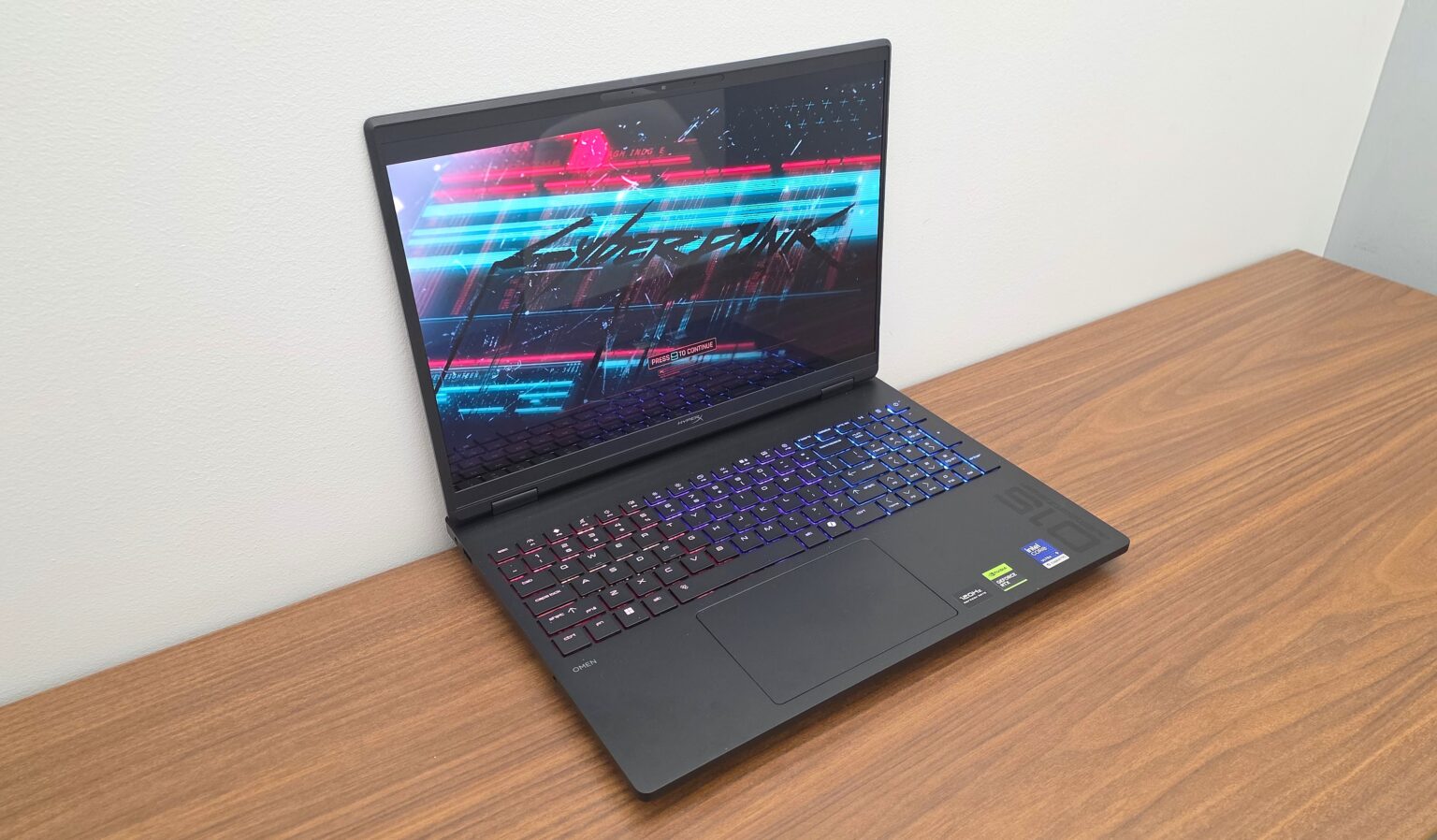
Today, we take a look at the latest in gaming laptops by HP – HyperX in the form of the HyperX OMEN 15-inch gaming laptop. With build options featuring up to 170W total platform power, up to NVIDIA RTX 5070 Graphics, and Intel® Core™ or AMD Ryzen™ processor choices, the new HyperX OMEN 15 looks to push performance to the next level. Those NVIDIA® GeForce RTX™ 50 Series GPUs showcase their graphics in IPS display options going up to 180Hz or a 3K OLED display at 120Hz. Toss in an 8K Hz polling rate keyboard, OMEN Tempest Cooling and OMEN Unleashed Mode overclocking and this laptop is looking to turn heads with its high-level components.
The HyperX OMEN 15 is offered in five base models. The lowest end starts at $949.99, housing an Intel Core i5 14500HX CPU and NVIDIA RTX 5050 graphics while sporting various customizable options. Here, we will look at the highest end model of this refreshed series of gaming laptops. So, let’s dive into the HyperX OMEN 15 to see what it brings to the table.
HyperX OMEN 15 (Review Model) Specs
| Processor | Intel Ultra 9 386H |
| Graphics | NVIDIA RTX 5070 8GB VRAM |
| Memory | 32 GB DDR5 (2 x 16GB) |
| Display | 15.3” 3K (2880×1800) OLED 120Hz |
| Storage | 1 TB SSD |
| Connectivity | – HDMI 2.1 – AC Smart Pin – Microphone/Headphone Combo Jack (AUX) – 1 GbE RJ45 – (Two) USB Type-A 10 Gbps – USB Type-C® 10Gbps 1 GbE RJ45 (USB Power Delivery 3.1, DisplayPort 1.4, HP Sleep and Charge) |
| Upgradeable Components | – Primary NVME M.2 SSD – Secondary NVME M.2 SSD (only on some models) – Wi-Fi Chip – SO-DIMM RAM |
| Audio | HyperX Audio Control, Dual speakers, DTS:X® Ultra, HP Audio Boost 1.0 |
| Battery | 70 Whr |
| Dimensions | 14.07 x 10.59 x 0.94 in (front); 14.07 x 10.59 x 1 in (rear) |
| Weight | 2314g/5.10 lb |
Build and Features

The highest end HyperX OMEN 15 model houses the latest generation Intel Ultra 9 processor, NVIDIA RTX 5070 graphics, and 32GB of DDR5 memory. In terms of brute processing and graphics power, that is surely nothing to sneeze at. However, this laptop is also built to last thanks to its Military Standard 810H Certified build. Ready to be taken on the go, the OMEN 15’s durability passed the necessary tests for its MIL-STD-810 certification, such as drop, shock, humidity, and temperature tests, to name a few. The laptop also has futureproofing in mind thanks to its component upgradability. Users can swap out the Primary NVME M.2 SSD, Wi-Fi Chip, SO-DIMM RAM, and secondary NVME M.2 SSD on their own.


Starting with the left side of the laptop, you have a USB-A port, a 3.5mm combo jack, and an AC Smart Pin for the laptop’s main power. On the right, you have another USB-A port and an ethernet port. Finally, on the rear, you have a USB-C and an HDMI 2.1 port.
The HyperX OMEN 15 offers three 15.3-inch display options, all featuring a 91% screen-to-body ratio. Your options are a 2K IPS display at 165Hz, a 2.5K display at 180Hz, and the one in our review model, a 3K OLED display at 120Hz. In our review model, this creator-geared display sports 100% DCI-P3 color aimed at showcasing high color accuracy in its visuals. From right off the bat, we were dazzled by the detail and color from this OMEN 15 model’s OLED display.


Before diving deeper into graphical performance, this display treats you with sharp and clean visuals backed by a rich color presentation. Colors are bright, distinct and vibrant, whether you are in bright or dark environments in-game. The colors are then complemented by the display’s 120Hz refresh rate, treating you to smooth motion in your higher frame rate games. Sure, the OMEN 15 is offered with IPS displays with higher refresh rates. However, if you care more about visual detail and accurate color representation, then this 3K OLED model delivers well on that front.

The laptop’s OMEN Tempest Cooling features HP’s latest hyperbaric design solution to cooling the CPU, GPU and NPU during workloads. It employs more heat pipes, allowing heat to spread out more evenly. Then, with newly optimized fan placements, expanded vents and a bottom intake, heat is dispersed more efficiently than in previous models. Even the laptop’s rear exhaust was improved to ensure that heat is pushed more directly away from the user and mouse-wielding hands. Adding to that is the fan self-cleaning functionality in the Intel models, where the reverse fan dust cleaning helps ensure that cooling remains efficient throughout the OMEN 15’s lifespan.
Not to be overlooked is the OMEN 15’s 8K polling rate keyboard, deployed for the first time in the OMEN laptop line. This keyboard features four-zone RGB lighting that endeavors to simulate a “per key” lighting look. The WASD lighting zone is now expanded to QWERASDF, covering more of the commonly used keys in the keyboard and mouse play style. Answering feedback from previous gaming laptop models, the new OMEN 15 now also sports full-sized arrow keys, for easier overall usability.

The keyboard is fairly comfortable to use thanks to the full-size key caps. As such, it does not take too long to get accustomed to key placement. If you are looking for more of a mechanical “clicky” feel, you will not get that here. However, the soft and punchy nature of keystrokes still make the keys feel satisfying to press.


Not to mention, the keyboard is visually easy on the eyes thanks to its customizable lighting via the preinstalled OMEN Gaming Hub. Whether you are using the laptop in bright or dark settings, the lighting on the keyboard adds to the immersion with four-zone lighting that you can customize.
The HyperX OMEN 15 sports a solid build both inside and out. On the outside, it is a sleekly designed laptop that is built to survive the physical trials of everyday travel. However, its self-cleaning fan and replaceable components also add some longevity to the overall lifespan of the machine, helping it keep up with you and the games of the future. Opening it up, you are treated to an impressive 3K OLED display and a no-nonsense 8K polling keyboard. Toss in the latest in Intel CPU’s and NVIDIA graphics, and you have one solid powerhouse for both gaming and creativity on the go.
More Features and Performance

Your experience with the HyperX OMEN 15 is highly customizable via the pre-installed OMEN Gaming Hub app. Through the app, you can monitor your PC’s status, change performance and overclocking settings, customize keyboard lighting and assignments, and access other quality of life settings.


What is especially interesting in the OMEN Gaming Hub is the Optimizer features, where you can boost the performance of your games and apps as well as tidy up your storage space. The Booster feature can be set to activate automatically whenever games and apps of your choosing are running. Within the Booster menu, you also have a nice assortment of options to toggle when the Booster feature is in play.


Overall, the OMEN Gaming Hub is a very approachable app for customizing your experience with the HyperX OMEN 15. You can take a stand-off approach and let the app’s automatic features and default settings manage your experience. Conversely, you can get granular with features and processes that you can tweak or disable for the sake of squeezing out more processing power for your games. Each function or process is listed with a description so that you understand what you are changing and why. You can even go as far as customizing network traffic directly from the app, ensuring that your PC is giving your game the most bandwidth when you play.

For a pre-included system app, it does a good job at making itself accessible to both novice and techy gamers alike.
When it comes to overall performance, the 3K-OLED model of the HyperX OMEN 15 powers through gaming with ease. Its Intel Ultra 9 CPU, NVIDIA RTX 5070 GPU and 32 GB of RAM allowed me to enjoy some of my favorite games at very high graphical settings. Now, with this model’s display refresh rate topping off at 120Hz, I wanted to make sure I got to experience the highest framerates that this PC could muster. So, I connected it to my ViewSonic XG272-2K-OLED, a 27-inch 240Hz gaming monitor, and dove right in.
Starting off with Cyberpunk 2077, I set all of the graphics settings to the highest possible values before running the game’s benchmark test.


With V-Sync and Ray Tracing off, I got to play Cyberpunk 2077 at a very good average of 159 FPS. During my play sessions, I rarely noticed any screen tears. So, I opted to leave V-Sync off to keep it from throttling my overall FPS numbers.


Of course, that average FPS number dropped sharply when I turned Ray Tracing on while leaving all of the other settings at High and Ultra.

However, there were ways to finagle various settings to low, medium or what-not if I wanted to play with reflective lighting effects at frame rates higher than the 20’s.


Nevertheless, I was plenty satisfied with the experience otherwise.
I had the same approach when playing my PVP shooter of choice, Apex Legends. Here, I went with V-Sync off and all settings set to their highest, while leaving the Texture Streaming Budget at 6GB.


Throughout all of my matches the game ran mostly at a very nice140 FPS, even during gunfights. Occasionally, it dipped as low as 110 FPS, but that was mostly when I was in the dropship, overseeing the entire map.


Under these conditions, Apex Legends was a joy to play as I was treated to crisp visuals at very high frame rates. Here is also where I appreciated the HyperX OMEN 15’s keyboard, with each keystroke feeling snappy and responsive during my gun fights. The keyboard’s 8K polling rate did not disappoint as it helped me continue to achieve some satisfying results in my matches.

Apex Legends did lead to some noticeable tears with V-Sync off. However, it was not at a level where I considered it experience-breaking. Turning on V-Sync, with the High/Ultra settings still in play, capped the game off at a still very respectable 120 FPS.
Then we have Street Fighter 6, a game that intentionally caps frame rates at 60 FPS in its matches. While you are still able to enjoy up to 120 FPS in single player experiences like World Tour Mode, a player vs player match will still be capped at 60 FPS. However, this is also an opportunity to activate all of the graphics features, set them to high, and see if the game still plays at its maximum intended frame rate.

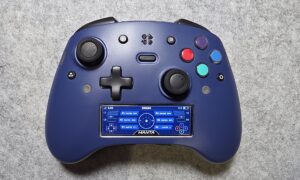
So, I connected the HyperX Tachi that we are also trying out and dove into some fights. The HyperX OMEN 15 did not disappoint as it showcased all of the game’s graphical features while retaining its highest 60 FPS playability.

The general horsepower of the 3K OLED model of the HyperX OMEN 15 is not to be understated. It is capable of running current-day games at their highest settings at some very respectable frame rates. Throughout all of the aforementioned gaming sessions, the laptop was plugged in while running in performance mode. Despite running these games as efficiently as it did, the laptop remained subtly warm, even after up to seven-hour long gaming sessions. Clearly, the new OMEN Tempest Cooling system was getting the job done.
Even if you are a road warrior, playing straight off the laptop itself, you are still treated to at least 120 FPS due to the limitations of the 3K OLED display. Not to mention you have that solid 8K polling rate keyboard that performs so well that you only have to worry about bringing a mouse on your travels.
In terms of features and performance, the HyperX OMEN 15 delivers in a big way and does not disappoint.
Final Thoughts
The 3K OLED model of the HyperX OMEN 15 is a strong entry in the gaming laptop market. It sports impressive specs, features a brilliant display, and is armed with a gaming quality 8K polling rate keyboard. Its MIL-STD-810 certified build clears it for everyday travel and its replaceable components help make it a worthwhile investment for quite some time. Topping that off is a self-cleaning fan feature and an approachable software suite that not only helps you maintain that investment but also helps you optimize its performance to the best of its ability.
Now, as the highest-end model of the new Hyper OMEN 15, it is priced at $2799.99. However, this model should hold you off at a high level of performance for years to come.
If you want to check out the model we reviewed here for yourself, you can do so by clicking here. If this model is a bit of an overshot for your needs, HP and HyperX also offer various models, including ones with AMD Ryzen processors, with pricing starting at $949.99.

† We were provided with a HyperX OMEN 15 gaming laptop for review purposes and were not compensated for this review.