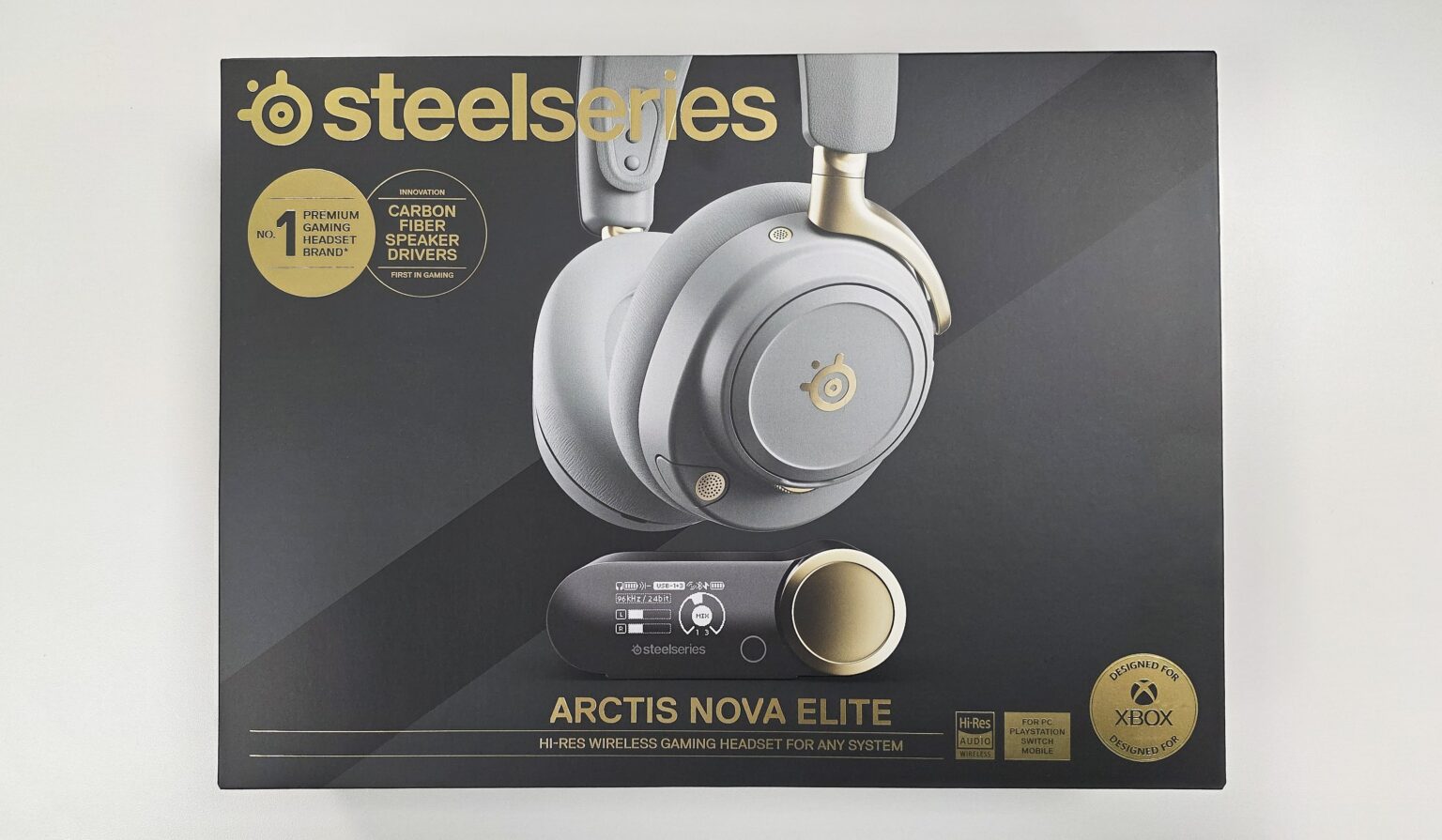
Today, we will look at the very best that SteelSeries has to offer in wireless gaming audio. Introduced as the world’s first Hi-Res Wireless Certified headphones for gaming, the Arctis Nova Elite sits at the very top of SteelSeries’ Arctis headphone line. Touting audiophile-grade sound through 24-Bit/96KHz transmission and sporting custom 40mmCarbon Fiber Speaker Drivers, this headset looks to redefine what the pinnacle of gaming audio is meant to be. Throw in GameHub and OmniPlay, technology that allows you to hear simultaneous audio from up to four sources, and SteelSeries just may have the ultimate gaming audio solution here.
Let’s dive into SteelSeries’ highest end headset to date and see what the Arctis Nova Elite brings to the table.
SteelSeries Arctis Nova Elite Specs
| Drivers | 40mm Carbon Fiber Drivers |
| Frequency Response | 10-40,000 Hz |
| Sensitivity | 101 dBSPL@ 1kHz/1mW |
| Impedance | 38 Ohm |
| Total Harmonic Distortion | <1% |
| Microphones | ClearCast Gen 2.X 16-bit 32 kHz, Boom Retractable On Ear Voice Microphone |
| Battery Life | 30 hours per battery |
| Connectivity | 2.4GHz Wireless – 96kHz / 24bit Bluetooth 5.3 + LE Audio |
| Headset Connectivity | 3.5mm Audio USB-C power |
| GameHub Connectivity | 3x USB-C (Port 3 Xbox capable) 3.5mm Line-in / Line-out |
| Dimensions (H x W x D) | Headset: 192.6×168.4×88.7mm Carrying Case: 285x230x12.7mm GameHub: 42.83×82.57×115.12mm |
| Weight | Headphones: 380g Carrying Case: 143g GameHub: 169g |


The SteelSeries Arctis Nova Elite headset comes in Obsidian and Sage Gold colorways. It comes packaged with the GameHub transmitter, three USB-C to USB-A cables, a 3.5mm cable, an optional pop filter, two rechargeable headset batteries, and a carrying pouch.
Build, Features and Comfort

The Arctis Nova line of headsets are a product of SteelSeries’ collaboration with Danish designer Jakob Wagner. That is no different here with the Arctis Nova Elite designed with the goal of combining minimalism with elegance and comfort. The headset sports an all-metal frame, a metal control wheel and memory foam filled leatherette ear cups. The ear cups hang on pivoting hangers and are height adjustable, sliding up and down along the headband. The staple flexible tension band has several adjustment options under the headband that allow you to control the overall tightness of the headset. These four points of adjustment make up the Arctis Nova Elite’s ComfortMAX system.


The headlining component of the Arctis Nova Elite headset is its Carbon Fiber Speaker Drivers, producing a wide range frequency of 10Hz to 40kHz. These drivers are encapsulated by a custom-designed brass surround to help drive accurate hi-fidelity sound. This sound is transmitted from the headset’s GameHub at a rate of 24-Bit/96KHz, using a next-gen LC3+ codec. This ensures that your sound sources are transmitted wirelessly to the headset with the highest possible level of detail and range. Going further, the GameHub can transmit up to three connected sources of sound at these rates and ranges simultaneously. This is done using any two of the three USB-C sources in tandem with the Line-in source.

When it comes to controls, there is a lot to cover here with the Arctis Nova Elite. On the left ear cup, you have the main power button, the mic mute button, a volume wheel button, the headset’s retractable ClearCast Gen 2 mic, and a 3.5mm jack for using the headset in wired mode. On the right cup, you have the headset’s multi-purpose Bluetooth button. When the boom mic is retracted, the headset utilizes an second on-ear imbedded mic, giving you an alternative to voice communication.


The Arctis Nova Elite’s main power button also controls the headset’s Active Noise Cancelation and Transparency features. The headset features a 4-mic hybrid system that drives these two listening modes. A single press of this button toggles ANC on and off. A double press activates the Transparency mode, which allows you to hear your surroundings through the headset.
The Bluetooth button allows you to pair the headset with a Bluetooth-ready device. Holding the button toggles Bluetooth on and off. When the headset is paired with your mobile device, you can also use this one button to control your media. Single presses play and pause, double presses initiate “next track” and triple presses triggers “previous track”.
On the outside of each of the ear cups, you have magnetic ear plates displaying the SteelSeries logo. Under the right ear cup plate, you have the slot for one of the headset’s rechargeable lithium-ion batteries. Under the left, you have a USB-C port which can be used as a means of recharging the headset using a USB-C cable.

Then you have the GameHub, the wireless transmitter which is the main driver of your experience with the Arctis Nova Elite.


The GameHub has three multi-purpose USB ports, with one of them being a dedicated Xbox USB port. While the dedicated Xbox port is self-explanatory, the other USB ports can connect to your PC, Nintendo Switch, or even your PlayStation 4/5. However, the Xbox port can also be used for connecting to non-Xbox sources as well.
You also have line-in and line-out ports. The line-in port lets you connect to yet another inbound audio source. The line-out port allows you to forward all of the sounds coming into your headset to either external speakers or your PC for streaming purposes. All of this makes up the OmniPlay system.
The GameHub features a detailed LED interface on the front. Users can use the wheel and button controller on the right to browse and change various settings on the fly. You can also finagle through these menus using the volume wheel button on the headset’s left ear cup, if you choose. On the home screen, the GameHub lets you quickly adjust both the master headset volume and the game and chat balance.


However, the Main Menu gives you a level of control that goes even deeper than that. Here is where you can tweak the sound balance between your three USB-connected sources or toggle options for surround sound, EQ’s, gain, sidetone, and mic volume. You can also toggle the audio output settings for the line-out port between speakers and streaming settings.
Lastly, you have the return of one of my favorite features from the Arctis Nova Pro Wireless in the form of the Infinity Power System. The Arctis Nova Elite comes with two removable batteries. This is because one battery is used to power the headset while the other recharges in the GameHub. While a single battery can give you up to 30 hours of headset use, you never have to remember to recharge the headset with this system. When the headset’s battery is low, simply swap the batteries between the headset and the GameHub and get back to playing in mere seconds. The GameHub’s home screen even shows you the battery levels for both the headset’s battery as well as the recharging one.


However, if you are away from the GameHub and you are in a pinch for power, 15 minutes of charging directly into the headset’s USB-C port can give you up to 4 hours of use.
Before even diving into audio performance, the Arctis Nova Elite’s build and feature set alone do plenty to validate a solid portion of its price point. ComfortMAX’s four points of adjustment allow the Arctis Nova Elite to be a highly flexible, and thus quite comfortable headset to wear. I would wear the Arctis Nova Elite for five to six hours straight, at times forgetting that I was even wearing the headset for that long. SteelSeries always made comfortable headsets. That certainly did not change with the Arctis Nova Elite. Not to mention, whether it is the Obsidian or the Sage Gold model, you have a headset that is very easy on the eyes.
All of the controls on both the headset and the GameHub are straightforward and responsive, allowing for quick on-the-fly changes to your listening and usage experiences. If you decide not to use the included pop filter, as I did, you can make use of the mic’s red LED indicator that hints when your mic is muted. Through the GameHub, the number of options you have for customizing your experiences with the headset and your console of choice is impressive to say the least.
Going further, the Arctis Nova Elite is a multi-wireless headset, simultaneously playing sound from up to four different sources at the same time. That is sound from up to three sources connected to the GameHub in addition to the source your headset is connected via Bluetooth. Want to listen to a YouTube game tutorial on your phone while still hearing the game playing from your console? Want to be in a Discord chat on your PC while still hearing in-game sounds from your Xbox? Being compatible with practically every current gen platform out now, the Arctis Nova Elite has you covered.
Being an Xbox, PC, Nintendo Switch 2 and mobile gamer, it is comforting to know that I can use one singular audio solution for all of these platforms. I simply boot up the platform of my choice, turn on the headset and start gaming, without having to toggle sound sources. On top of all that, it is a wireless ANC headset that you can even take on the go with your mobile device for everyday music and media consumption. The Arctis Nova Elite is just that versatile.
Take all of these features, as well as the notable convenience of the Infinity Power System, and you are quite close to getting your money’s worth with the Arctis Nova Elite.
More Features and Performance

At its base, the Arctis Nova Elite provides a rich and detailed sound presentation from its default “Flat” EQ. Lows are deep without being muddy, allowing for clean and vivid explosion sounds and immersive rumblings from nearby vehicles. Mids are solid as both in-game spoken word and teammate voice chat come through crisp and clear. Most importantly, highs are sharp and easy to pick up. Combine that with your favorite spatial sound provider and gunshots, reloads, and footstep locations are easy to decipher. Considering the myriad of EQ controls this headset provides, from the jump the Arctis Nova Elite gives you an excellent sound presentation base that you can take right into any game genre.
The Arctis Nova Elite is compatible with Microsoft Spatial Sound and Tempest 3D audio for PS5. During my time with the Arctis Nova Elite, I stuck with Dolby Atmos for Headphone for my 3D sound driver since I already have a working license. I was not disappointed. Not only was I presented with immersive audio from two of my favorite first person shooters, but enemy audio queues were never missed. In Apex Legends, I remained aware of my enemies’ presence as I racked up win after win. Sure, Apex Legends has its ongoing troubles with footstep sounds in general. However, thanks to the clarity of this headset’s sound presentation, I was still able to home in on gunshot and ability sounds to compensate.


While the default “Flat” EQ is an impressive and effective baseline for gaming, I also gave the “Focus” EQ a try. When it comes to EQ settings on gaming headsets, the PVP-focused EQ’s tend to follow a trend. What you would get was a sound presentation with a deep focus on the high range sounds which came at the noticeable expense of the other ranges. While that is also the case with the Arctis Nova Elite, I was impressed with how the “Focus” EQ dealt with the ranges that did not pertain to enemy sound queues. Sure, enemy sound queues were a bit sharper with this EQ, but the other sound ranges were still present at enjoyable levels. For a packaged PVP-focused EQ, it was a much more balanced sound presentation than I expected while still achieving the intended benefits.
In Destiny 2, I was particularly impressed. With invisible and crouched Hunter gameplay being so prevalent now days in PVP, I need to be extra alert with my obnoxiously shiny Titan. As I used the Arctis Nova Elite in Trials of Osiris runs week after week, hearing enemies trigger abilities and/or going invisible never felt easier. Going Flawless each and every week with the Arctis Nova Elite was definitely a breath of fresh air.


One of the biggest strengths of the Arctis Nova Elite is its high level of customizability. When connected to the PC, the free SteelSeries GG software gives you all of the controls you have from the GameHub and more. The SteelSeries GG Engine mirrors the settings you can control from the GameHub directly. You also have access to over 200 game-specific packaged EQ’s, created by SteelSeries.


However, the SteelSeries GG Sonar Software goes much further in how you can control the headset’s sound, both inbound and outbound. Sonar gives you detailed controls of your EQ’s, your 3D sound presentation, and your mic and chat presentation to others. With this software, you can fine-tune the Arctis Nova Elite to meet your exact tastes.


While that is all fine and good for PC users, we have to consider how console gamers would access such features. Nevertheless, console-only gamers get to enjoy high levels of customizability as well. Using the GameHub, not only can you toggle through any of the headset’s packaged EQ’s, but you can also fine tune your very own right on the fly. Just use the GameHub’s controls to choose the bands you want to tweak and have at it.

If you have your headset connected to your mobile device via Bluetooth, the Arctis mobile app gives you yet another means of quick access to your headset’s features. Using the app, you can alter the behaviors of the headset, with exclusive behavior sets for 2.4Ghz and Bluetooth connections. You also have full access to the packaged EQ’s here as well. Regardless of the platform you are on or where you are with the Arctis Nova Elite, the ability to tweak your headset on the fly is always there.


On the 2.4Ghz connection, the ClearCast Gen 2 mic shines, delivering my voice to my teammates with clarity. The Arctis Nova Elite solidifies this further with a nice level of user control of mic volume levels. I find it shocking that in this day and age, there are so few console-directed headsets that give you any control of your mic’s gain or volume. This is rarely an issue on PC with any headset since so many chat clients give you a reasonable level of control via their software. Here, the Arctis Nova Elite gives that level of control to the console gamer. With as close as my desk is to the living room TV, this is a very welcome feature, indeed. The mic not only gets top marks in clarity but also in its ability to let you control how much of your side your teammates can hear.
On Bluetooth, both the boom and on-ear microphones continue to handle well. My call participants mentioned that they heard a little more of my surroundings than they did when I was talking to them through the 2.4Ghz wireless connection. Despite this, the clarity of my voice still remained strong, allowing me to maintain conversations without much distraction to callers on the other end.
Speaking of that distance between my desk and the living room TV, I have a gaming scenario that begs for the use of Active Noise Cancelation. Before I even turned on the headset’s ANC, I should say that the acoustic seal of the Arctis Nova Pro Wireless’ ear cups is quite effective. Using passive sound isolation alone, I have no trouble at all focusing on my games. Therefore, while the ear cups excel in comfort, they are also a great front line of defense against ambient sounds. However, when ANC is on, the in-game immersion is truly complete.
Whether ANC was on or off, I did not notice any changes or takeaways from the sound presentation. At an at-home or indoors setting, the ANC was more than enough to drown out any sounds from both inside the home or the streets. Yet, being a fully equipped Bluetooth headset, the Arctis Nova Elite practically dared me to try out that ANC outdoors.

Therefore, to check out exactly how good the ANC was, I brought the Arctis Nova Elite to a local bar. I hopped on the Wi-Fi and booted up Apex Legends on the Nintendo Switch 2. When media is playing, the headset’s ANC does an impressive job at suppressing much of the local banter and music playing around me. The occasional yelling or laughing did seep through from time to time. However, with the vast bulk of ambient sounds being suppressed, I was able to remain immersed in my gameplay throughout my entire session. In the end, the ANC on this headset was quite solid and got the job done without distorting sound presentation.
Final Thoughts

Priced at $599, the Arctis Nova Elite’s cost is enough to give anyone pause. However, let’s consider what you are getting here. It is a wireless headset with audiophile-grade sound that you can comfortably use for any use case, whether it be for gaming or general media consumption. It can simultaneously play up to four sources of sound without disrupting any of the individual sound presentations.
It is compatible with practically any gaming platform out now and is armed with ANC that could rival that of many premium headsets today. You then have practically endless wireless play thanks to the Infinity Power System, which gets you back into the game in seconds. Lastly, you have the kind of feature customization suite that you should expect for a headset like this, being both comprehensive and accessible at the same time.
Considering that this headset was launched last year, this is more than just the headset to beat for 2025, or even 2026. The Arctis Nova Elite is possibly the last headset you will ever need for any gaming scenario thanks to its quality, features and versatility. If you are prepared to make the $599 plunge, the Arctis Nova Elite should be able to hold up its side of the deal for all of your platforms for years to come.
If you are interested in checking out the Arctis Nova Elite for yourself, you can do so by clicking here.

† We were provided with the SteelSeries Arctis Nova Elite headset for review purposes and were not compensated for this review.