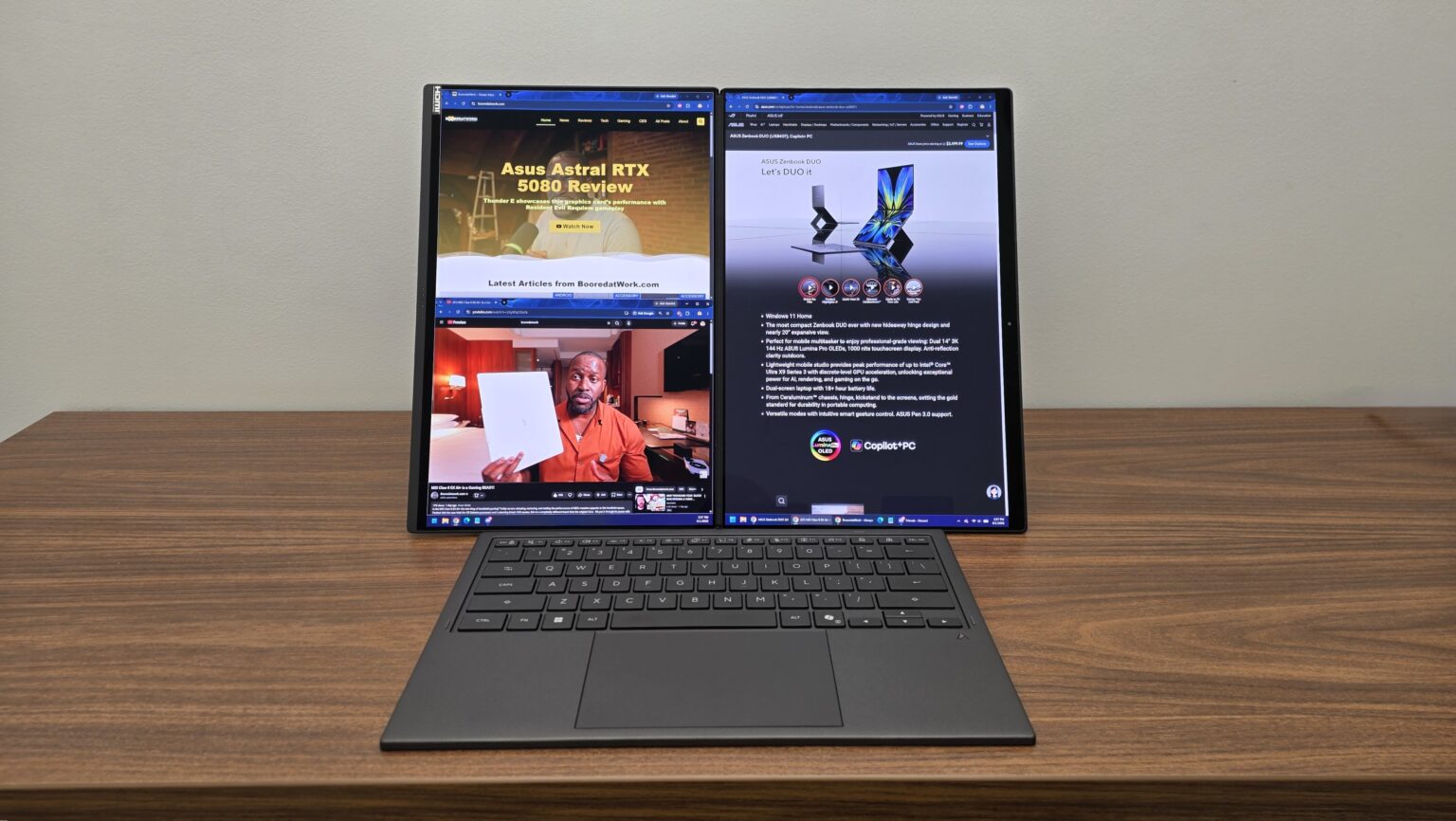
At CES 2026, ASUS unveiled the ASUS Zenbook DUO 2026 edition of their premier dual screen laptop. It is the second iteration of their laptop of the same name, this time sporting upgraded components and a new hinge design. The ASUS Zenbook DUO offers you the portability of a clamshell laptop while expanding into several multi-screen setups when removing its wireless keyboard. With models offering up to the Intel® Core™ Ultra X9 Processor and Intel® Arc™ Graphics, this laptop looks to revolutionize portable productivity.
So, how does this laptop, with pricing starting at $2499, hold up in both functionality and performance? Let’s dive into the ASUS Zenbook DUO (2026) to see what it brings to the table.
ASUS Zenbook DUO UX8407 Review Model Specs
| Operating System | Windows 11 Home (Windows 11 Pro – optional) |
| Processor | Intel® Core™ Ultra X9 Processor 388H 2.1 GHz (18MB Cache, up to 5.1 GHz, 16 cores, 16 Threads); Intel® NPU up to 50TOPS |
| Graphics | Intel® Arc™ Graphics |
| Neural Processor | Intel® NPU up to 50TOPS |
| Display | 14.0-inch, 3K (2880 x 1800) OLED 16:10 aspect ratio, 0.2ms response time, 500nits, 1000nits HDR peak brightness, 100% DCI-P3 color gamut, 1,000,000:1, VESA CERTIFIED Display HDR True Black 1000, 1.07 billion colors, PANTONE Validated, Anti-reflection(AR) display |
| Memory | 32GB LPDDR5X on board Max Total system memory up to:32GB |
| Storage | 1TB M.2 NVMe™ PCIe® 4.0 SSD (2TB – optional) |
| Expansion Slots (includes used) | 2x Thunderbolt™ 4 with support for display / power delivery (data speed up to 40Gbps) 1x USB 3.2 Gen 2 Type-A, 1x 3.5mm Combo Audio Jack |
| Keyboard & Touchpad | Backlit Chiclet Soft Keyboard, 1.7mm Key-travel, Precision touchpad |
| Camera | FHD camera with IR function to support Windows Hello |
| Audio | Built-in array microphone Built-in speaker Smart Amp Technology |
| Network and Communication | Wi-Fi 7(802.11be) (Triple band) 2*2 + Bluetooth® 5.4 Wireless Card |
| Battery | 99WHrs, 4S1P, 4-cell Li-ion |
| Power Supply | TYPE-C, 100W AC Adapter, Output 20V DC, 5A, 100W, Input: 100~240V AC 50/60Hz universal |
| Weight | 1.65 kg (3.64 lbs) |
| Dimensions (W x D x H) | 31.01 x 20.86 x 1.96 ~ 2.34 cm (12.21″ x 8.21″ x 0.77″ ~ 0.92″) |
Specs from product specifications page.
Build and Features

In its clamshell form, Zenbook DUO provides you with the kind of comfortable usage experience that you would expect from any laptop out today. Where it excels is in how it can employ an instant desktop layout whenever you like. Being able to pop off the keyboard and trackpad to use wirelessly with a two-screen display allows for incredible productivity wherever you are. For someone like me, it becomes an invaluable companion for covering tech and gaming conventions whenever the need arises.


Each of the screens are sharp, bright and rich with color, making the Zenbook DUO solid for both work and play. Want to shoot off some emails while watching your favorite YouTube videos? Perhaps you need to have resource material on one screen for the write-up you are preparing on the other. Or, maybe you just want to take advantage of the Intel Arc Graphics and the display’s 144Hz refresh rate as you dive into some light gaming. Whether it is work, play or both at the same time, the Zenbook DUO is designed to power your experience wherever you take it.


The stand on the bottom of the Zenbook DUO is reassuringly rigid and strong, allowing for a secure hold when you have the laptop in either the Dual Screen or Desktop modes. Toss in the rubberized feet on both the stand and the laptop’s bottom and you have one solid wobble-free setup. Whenever your workstation allows for it, the laptop practically encourages you to use the vertically-inclined Dual Screen setup for ergonomics alone. The top screen sits more or less at eye level when you are seated, allowing you to sit up straight and face forward. In this setup, I found myself focusing the bulk of my work on the top screen while I left either notes or comfort vids playing on the bottom.

I particularly liked how the Zenbook DUO handles its Desktop Mode as well. Not only does this mode allow for comfortable long form reading and writing, but it does a decent job as a combined screen as well. ASUS redesigned the hinge between the two screens, allowing them to sit much closer to one another than in the previous model. This allows you to use the screens in tandem where you can expand content fully across both screens. Thanks to the reduced presence of these bezels, you can enjoy a singular large screen display that plays well for video and movie watching.


Completing these experiences is the impressive removable keyboard and trackpad panel. Whether I used the laptop in clamshell mode or in either of the expanded display modes, I was treated to a clean and enjoyable usage experience. The keyboard is especially comfortable to type on, with keys providing a nice amount of bounce while feeling soft to press. Longform typing, like with this review, felt effortless and pleasant for hours on end. It is then well-complimented by its backlit keys, making the Zenbook DUO easy to use in any lighting scenario.

Not to be ignored is its smooth trackpad, offering precise mouse cursor and gesture input accuracy. The trackpad’s precision and responsiveness does a solid job at encouraging you to leave the mouse at home. While I prefer to use a mouse for photo edits due to simplicity and muscle memory, this trackpad allowed me to make those same edits with plenty of ease.
The keyboard and trackpad are then topped off by its general portability. When it is connected to the bottom screen, this keyboard/trackpad panel recharges from the laptop directly. It is also sending its inputs in a sort of “wired” mode, using the magnetic connectors at the base of the bottom screen. When you are using the laptop in either Dual Screen or Desktop Mode, you can use this panel via Bluetooth using a switch on the panel’s side. Finally, when it is time to close up shop, the laptop closes cleanly on the removable keyboard, allowing you to keep your laptop and peripherals in one neat and complete package.
Should you need to do some light typing, but the removable keyboard is not available, you can opt to use the bottom screen as your keyboard. Simply press six fingers onto the bottom screen to open up the touch keyboard. This keyboard has different layout options, offering two trackpad choices. There are options you can turn on to configure the strength of feedback vibrations as you press the keys, simulating a tactile key press response.


The touch keyboard is quite responsive while the trackpad is precise and easy to operate. However, given how easy it is to stow away the included physical keyboard, I did not see a case for using this input style over the physical one. Typing was easy enough using the touch keyboard thanks to muscle memory. However, my typing speed and accuracy paled in comparison to what it was when using the physical keyboard. It is a nice-to-have feature, but the physical keyboard’s usage flexibility practically eliminates it as a use case.
With the keyboard removed and the laptop laid open and flat, you can employ Sharing Mode. Here you can use the Zenbook DUO as a collaborative surface, where one side can mirror their screen to a person sitting across from you. You can then control what they see and make annotations on the fly, turning this laptop into a nifty presentation tool. You can even open up annotations for both sides simultaneously, allowing for more idea sharing options.


This feature is simple to employ and use, and I can see its merits. However, it did make me question whether using this sharing method would be easier than just having your presentation participant sitting next to you. In such a case, you could just employ either Dual Screen or Desktop Mode to get your point across with more screen real estate.
The Zenbook DUO sports an impressive build that practically validates its price point, even before diving into its performance. Here you have a laptop that a glance is your run-of-the-mill clamshell laptop. It is beefier than many non-gaming laptops in weight and thickness when closed. However, it sports that same general laptop portability. It then explodes with functionality thanks to its Dual Screen and Desktop Mode setups that you can employ wherever you like. Just like that, the Zenbook DUO is the ultimate portable office solution from its core functionality alone.
Performance and Media

While not built for gaming like its ROG Zephyrus Duo counterpart, the Zenbook DUO is no slouch in the performance department. So, we wanted to see what we could get out of that Intel Core Ultra X9 Processor, Intel Arc Graphics and 32GB of memory. So, with the laptop plugged in and power settings set to Performance Mode, we took the Zenbook DUO through some gaming scenarios.


First up was Cyberpunk 2077, where we applied mostly medium level settings with some of the quality lighting settings turned off. Running Cyberpunk 2077’s included benchmark tests, we were able to hit an average of 37 FPS, occasionally topping off at 45 FPS. If I were to describe game feel at this frame rate, it was quite similar to running this game on a PC gaming handheld console. Visuals are still nice and the game is still satisfying enough to play under these conditions.


We then booted up Apex Legends, a PVP game where frame rates matter a bit more. Using a mixture of high and low video settings, the game maintained a roughly 70 FPS framerate, bottoming out around 65 FPS and topping off at 80 FPS. While this is not what I was used to at 120 FPS+, this was still more than manageable for competitive gameplay.
Overall, I was impressed by the general performance of the Zenbook DUO. It is a laptop with plenty of horsepower to drive you through both work and play. The 32GB of RAM allows for the level of multi-tasking that you would expect on a machine with two screens. You then have an Intel Core Ultra X9 Processor and Intel Arc Graphics, propelling this laptop as a viable option for graphic designers on the go. Thanks to the Zenbook DUO’s processing power, you are bound to get the most use out of the laptop’s two screens.
Speaking of screens, the displays of this laptop are nothing short of impressive. These ASUS Lumina Pro OLED displays are Pantone Validated, VESA certified and sport a 144Hz refresh rate. Thanks to this, all visual media is a dream to look at on these screens. Colors are sharp with a nice representation of absolute black. Toss in the 0.2ms response time and anti-reflection coating and you have a set of displays that you are bound to enjoy in both gaming and movie watching.

These displays are then complimented by the laptop’s six speakers, completing this multimedia experience with a crisp sound presentation. I would not depend on these speakers for the kind of positional audio that you may want in gaming. However, what you are treated to is an accurate and loud sound presentation that you will enjoy during casual video and movie watching.
The battery life on the Zenbook DUO is very solid. When it comes to light to moderate use, the laptop offers between 18 to 32 hours of use on a single screen or 12 to 18 hours using both screens. In my light use case, I spent around 2.5 hours writing using a single screen with keyboard backlighting on, with the power settings set to Balanced Mode. As this drained about 18% of battery life, I could have gotten up to 10 hours of laptop use under these conditions. That is a solid amount of work time covering the full duration of most flights within the US.
Then to push the envelope, I set the laptop to Performance Mode, connected a controller and dove into gaming, playing Apex Legends. I was able to get about two hours of gaming using these settings, which is not at all bad considering how much I was trying to intentionally stress the Zenbook DUO. It was nice to see that the Zenbook DUO’s battery could facilitate a nice amount of entertainment on the go if needed. Topping that off is its fast-charge technology, allowing it to charge up to 60% in 49 minutes.
In the end, the ASUS Zenbook DUO sports the kind of performance that you should expect from a laptop at its price level.
Final Thoughts
The ASUS Zenbook DUO is the ultimate productivity laptop of 2026. It is a laptop with impressive processing power and general overall specs for a laptop not marketed for gaming. If you want ASUS’ dual screen variant of that, perhaps check out the ROG Zephyrus Duo (2026), also announced at CES 2026. Considering that, the Zenbook DUO still holds up well in the gaming department thanks to its processing capabilities alone.
However, what makes the Zenbook DUO special is how well it handles both compact and dual display setups so seamlessly. Should you employ a single display, dual display, or a large display spread across two 14-inch screens, this laptop provides all those scenarios in one neat portable package. Whether you are working on a plane seat or a spacious desk, the Zenbook DUO is ready for both your portable and stationary workstation needs.
A laptop with pricing starting at $2499 can be tough to swallow at face value. However, consider what you are paying for. That price covers two impressive monitors, solid PC processing power, and a quality keyboard/trackpad combo that will convince you to leave any extra peripherals at home. Not to mention all of that fits into a single everyday laptop sleeve. Combining all of this, the Zenbook DUO does a great job at validating its price point.
If you want to check out the Zenbook DUO for yourself, you can do so by clicking here.
† We were provided with the ASUS Zenbook DUO (2026) UX8407 dual screen laptop for review purposes and were not compensated for this review.